# Gofu
Gofu is a multibinary containing several utilities that I use everyday.
## What's with the name?
A gofu, [according to Wikipedia](https://en.wikipedia.org/wiki/Gofu), is a
type of household amulet or talisman, issued by a Shinto shrine, hung in the
house for protection.
Alternatively, the name can also be read as
"[Go](https://golang.org)-[fu](http://www.retrologic.com/jargon/F/suffix-fu.html)".
# Installation
```bash
$ make && make install
```
# List of applets
## `mdedit`
This provides a very simple in-browser Markdown editor with a preview pane.
Run as `mdedit path/to/document.md localhost:8080` and then navigate to
to start editing. Changes will automatically be saved
to the server (and thus to the source file) after one second of no typing.
It is recommended to not listen on anything besides `localhost`; there is no
authentication or anything.
## `prettyprompt`
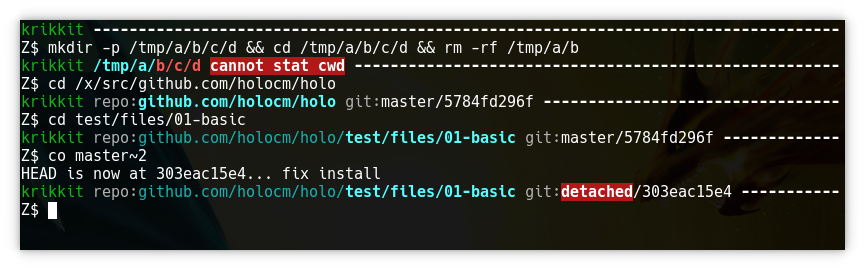
This renders my shell prompt. Among other things, it identifies the current
host by name and signature color (in the screenshot below, dark green for
Krikkit); highlights path elements inside a Git repo (if any) and path elements
that have been deleted; reports the current Git repo status; and reports the exit
code of the previous command (if it failed). It also heavily saves space where
possible, e.g. if the cwd starts with `$GOPATH/src/`, that is shortened to
`repo:`. A prefix of `$HOME/` is omitted entirely, as is my default user name.
## `rtree`
This manages my Git repositories. Borrowing from the convention established by
Go's `GOPATH`, the location of each local repository is defined by its remote
URL. For example, this repo here will always be checked out at
```
$GOPATH/src/github.com/majewsky/gofu
```
The most common operation with `rtree` is to get a repository path:
```bash
$ rtree get https://github.com/majewsky/gofu
/x/src/github.com/majewsky/gofu
```
This will automatically clone the repo if it has not been cloned yet. Git URL aliases [like
these](https://github.com/majewsky/devenv/blob/2642c2e2040e029b4334d55f0714bb86fc24d4a9/toplevel/gitconfig#L55-L56) are
supported. I use a [shell function called
`cg`](https://github.com/majewsky/devenv/blob/2642c2e2040e029b4334d55f0714bb86fc24d4a9/toplevel/profile#L47-L50) that
means `cd to git repository` and is based on `rtree get`:
```bash
$ pwd
/home/stefan
$ cg gh:majewsky/gofu
$ pwd
/x/src/github.com/majewsky/gofu
```
When `rtree get` clones a new repo, it will look for existing repos with the
same basename, and prompt the user about whether to treat this repo as a fork
of some other repo:
```
$ cg gh:forkof/holo
Found possible fork candidates. What to do?
[ ] add as remote to /x/src/aur.archlinux.org/holo
[ ] add as remote to /x/src/github.com/holocm/holo
[n] clone to /x/src/github.com/forkof/holo
```
There are a few other subcommands in `rtree`:
* `rtree drop ` deletes the local repo identified by the given remote URL (after asking for confirmation).
* `rtree repos` lists the paths (below `$GOPATH/src`) of all local repos.
* `rtree remotes` lists the remote URLs of all local repos.
* `rtree each ` executes the given command in each repository. My most common usecase is `rtree each git status --short`.
* `rtree import ` takes a path to a local Git repo, and moves it to the correct place below `$GOPATH/src`.
Finally, `rtree index` rebuilds the index file (`~/.config/rtree/index.json`) that all of these operations use to find repos
and remotes. If a repo is checked out, but not yet indexed, the index entry will be added. If the repo for an index
entry is missing, the user will be prompted about what to do:
```
$ rtree index
repository /x/src/github.com/Masterminds/sprig has been deleted
[r] restore from https://github.com/Masterminds/sprig
[d] delete from index
[s] skip
```
One of the intended usecases is that stuff below `$GOPATH/src` does not need to be backed up. As long as the index file
`~/.config/rtree/index.json` is backed up, all repos can be restored in one step with `yes r | rtree index`.